
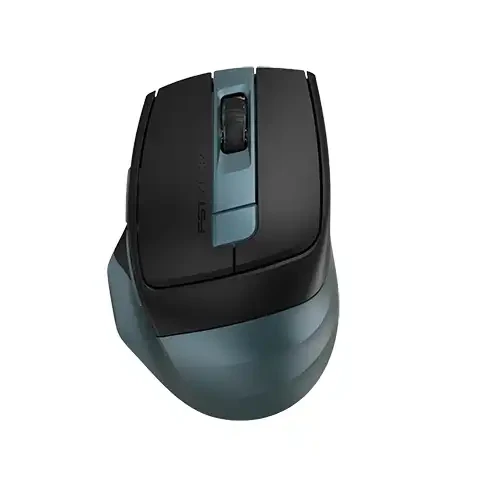
A4TECH FB35CS Fstyler Silent Click Dual Mode Rechargeable Wireless Mouse
✅ Available Save ৳ 300 (- 17)% SKU: IC--13575 Brand: A4TECH
Key Features
Warranty: 1 Year
What is A4TECH FB35CS Fstyler — Overview & Purpose
The A4TECH FB35CS Fstyler is a wireless computer mouse designed for everyday computing — from office work and browsing to casual creative tasks. Its key selling points are dual-mode connectivity, silent clicks, rechargeable battery, and multi-device support — making it a versatile choice for users who value flexibility, comfort, and convenience.
Whether you’re working at a desk, editing documents, managing multiple devices (e.g. laptop + tablet + desktop), or simply browsing, this mouse aims to deliver a balanced, user-friendly experience.
⚙️ Core Features & Technical Specifications
Here’s a breakdown of what the FB35CS offers:
-
Dual-Mode Wireless Connectivity: Supports Bluetooth and 2.4 GHz wireless (via nano USB receiver) — enabling you to connect to a variety of devices (laptops, desktops, tablets, etc.). Switching between modes is easy.
-
Multi-Device Support: It can pair with up to 3 devices simultaneously (2 via Bluetooth + 1 via 2.4 GHz), allowing seamless switching between them — handy if you use multiple systems.
-
Silent Click Technology: The left and right mouse clicks are designed to be near-silence — perfect for quiet environments such as offices, shared spaces, libraries, or late-night work.
-
Adjustable DPI / Sensitivity: You can adjust cursor sensitivity — typical settings include 1200 / 1600 / 2000 DPI (some listings mention up to 2400) — giving flexibility in pointer speed depending on the task.
-
Rechargeable Battery with USB-C: The mouse is powered by a built-in lithium battery and charges via USB Type-C — no need to keep replacing disposable batteries. A full charge usually takes around 2.5 hours.
-
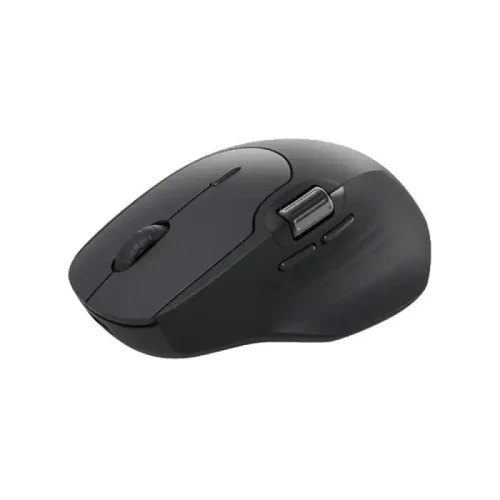
Buttons & Controls: Common buttons: left click, right click, scroll wheel (middle click), plus two side thumb buttons (typically preset for forward/back navigation) — useful for browsing, productivity, or light workflows.
-
Compact, Lightweight & Ergonomic Build: The design is meant to fit comfortably in hand and support long hours of use. Its portability also makes it suitable for travel or laptop-based work.
-
Plug-and-Play & Multi-Platform Compatibility: The mouse works out of the box with Windows, macOS, Chrome OS, even Android (for devices that support external pointers) — no special driver installation needed.
✅ What It Does Well — Strengths & Real-World Benefits
-
Noise-free operation: Silent click feature makes it a great fit for shared workspaces, libraries, late-night studying or working, or any environment where quiet is appreciated.
-
Flexible connectivity & multi-device switching: Dual mode + multi-device pairing means you can use one mouse across a desktop, laptop, tablet — switching with a button press, saving you from carrying multiple mice.
-
Rechargeable and low maintenance: With USB-C charging, you don’t need disposable batteries; just plug it in when battery runs low. More eco-friendly and convenient.
-
Good for everyday tasks: Adjustable DPI and standard button layout make it suitable for browsing, document editing, office work, light design tasks, casual browsing, etc.
-
Portable and ergonomic: Lightweight and easy to carry with a laptop — a practical option for students, professionals on the go, or remote workers.
-
Broad compatibility: Works across many OS and device types — ideal if you switch between computers or use different devices for different tasks.
⚠️ Limitations & What to Consider — Trade-offs Compared to Specialized Mice
-
Not a high-end gaming mouse: DPI tops out at modest levels; polling rate, sensor performance, and button features aren’t tailored for competitive gaming. For serious gaming or precision-heavy tasks, a dedicated gaming mouse would be better.
-
Basic sensor and response: While sufficient for everyday use, the tracking and responsiveness may not match advanced gaming or professional creative-work mice.
-
Battery life depends on usage: Even though rechargeable, heavy continuous use, frequent switching, or long idle times may drain battery — periodic charging / monitoring is needed.
-
Limited advanced features: No fancy extras — e.g. no customizable RGB, no onboard memory for macros, no ultra-high DPI, no specialized ergonomic sculpting. It’s designed for general use rather than pro-level customization or intense workflows.
-
Possible multi-device switching lag: While switching between devices is supported, wireless switching (especially between Bluetooth and receiver) may incur slight lag or delay — not ideal if you need instant switching seamlessly.
🎯 Who It’s Best For — Ideal Users & Use Cases
The FB35CS is an excellent choice for:
-
Students, office workers, professionals — anyone who does lots of typing, browsing, document editing, or multi-device work.
-
People working in quiet environments — libraries, shared offices, study rooms, late-night sessions — where silent clicks help maintain focus.
-
Users with multiple devices: e.g. laptop + desktop + tablet — who want one mouse for all without switching.
-
Portable / laptop users — needing a compact, rechargeable, wireless mouse that travels easily.
-
Everyday computing and productivity tasks — writing, coding, browsing, email, presentations, light graphic work, content editing.
Why Buy A4TECH A4TECH FB35CS Fstyler Silent Click Dual Mode Rechargeable Wireless Mouse in Bangladesh?
The A4TECH FB35CS Fstyler Silent Click Dual Mode Rechargeable Wireless Mouse is one of the most reliable options available in Bangladesh. It offers excellent performance, durability, and value for money. If you're looking for authentic A4TECH products with Warranty: 1 Year support, this model is a perfect choice.
Who Should Buy This Product?
- Home users
- Office and business use
- Professional users
What is the price of A4TECH FB35CS Fstyler Silent Click Dual Mode Rechargeable Wireless Mouse in Bangladesh?
৳1500
Is this product available in stock?
Yes, it is currently available.
Does it come with warranty?
Please check the description section for warranty details and Call for Update warranty Details



Total : 0.00
Write a Review